Factories
What a factory owns, its Report, Workflows, Runs, Repos, Access and Guardrails tabs, sandboxes per repo, roles, and how to archive one.
On this page
A factory runs one team’s work through to reviewed pull requests. It bundles the workflows that do the work, the repositories they open pull requests in, the guardrails every run follows, and the people who can use it. Each card on the Factories page shows how work flows through it: Work in → workflow → repos → PRs out.
To create one, see Build your first factory.
The Factories page
Factories lists every factory in the workspace as a card with its name, description, who it’s shared with, a PRs / week headline with a weekly trend, and its pipeline. The pipeline chips are links: the workflow chip opens the Workflows tab, the repos chip opens Repos.
Sort by Most PRs / week or Most running, or search by name. Browse factory templates opens Explore filtered to factories. Each card’s menu has Edit details (“Shown on the factory’s card.”), Manage access, Publish as template… and Archive….
Factory tabs
Open a factory to see its tabs: Report · Workflows · Runs · Repos · Access · Guardrails.
Report
The Report tab shows how the factory is doing over the Last 7 days, Last 30 days or Last 90 days:
| Tile | Meaning |
|---|---|
| PRs merged / week | Pull requests from this factory’s runs that merged |
| Cost / PR | Spend divided by merged pull requests |
| Autonomy | Runs that finished without asking a human |
| Cycle time | Median, issue ready → PR merged |
Below the tiles, Per step lists each step’s Avg cost, Avg time, Pass rate and Retries / run, and marks the bottleneck. Pass rate counts a step’s first attempt; retries are re-runs after a failed check or a returned review. The Leaderboard shows up once two or more builders ship here. Export CSV downloads the numbers.
Workflows
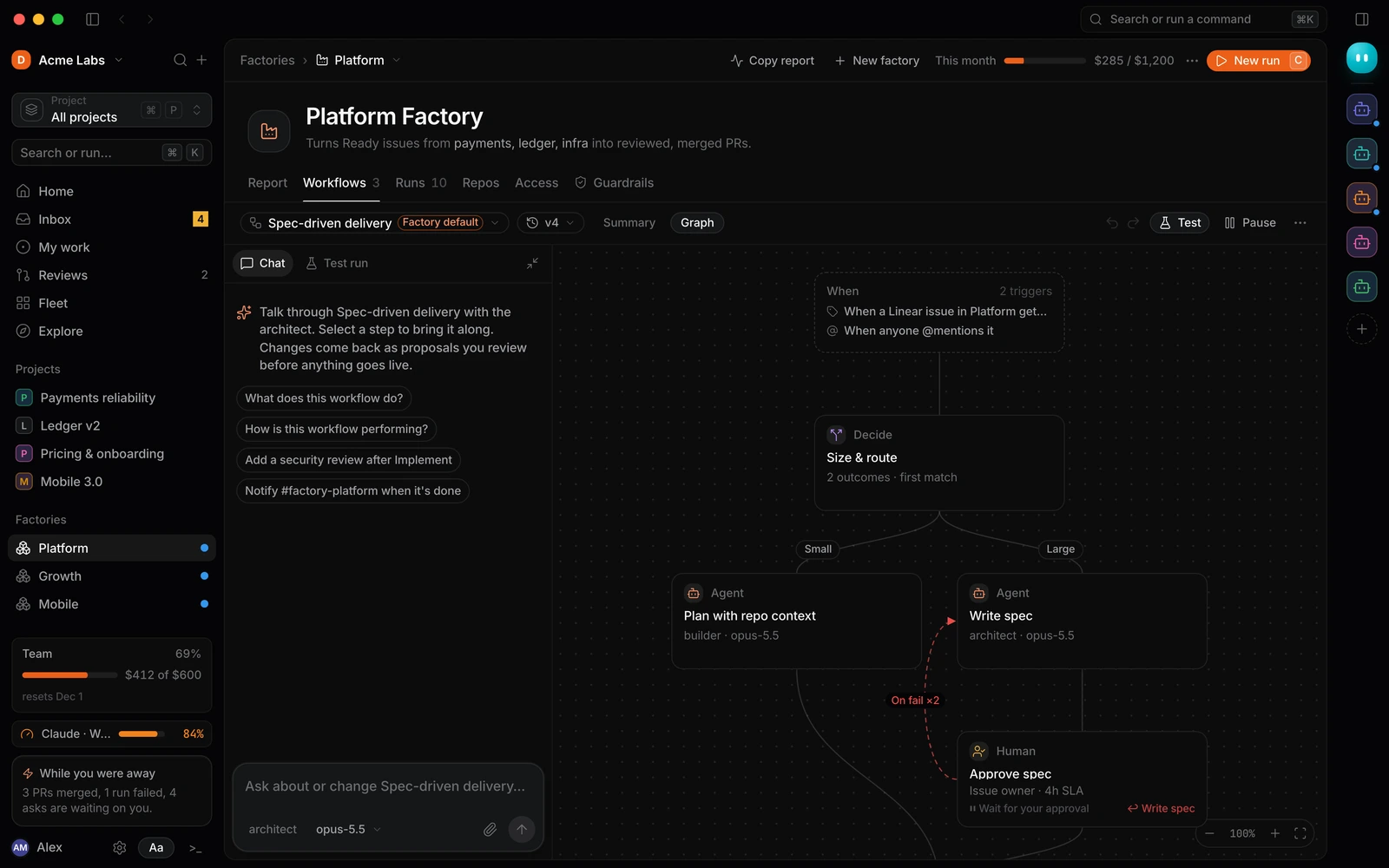
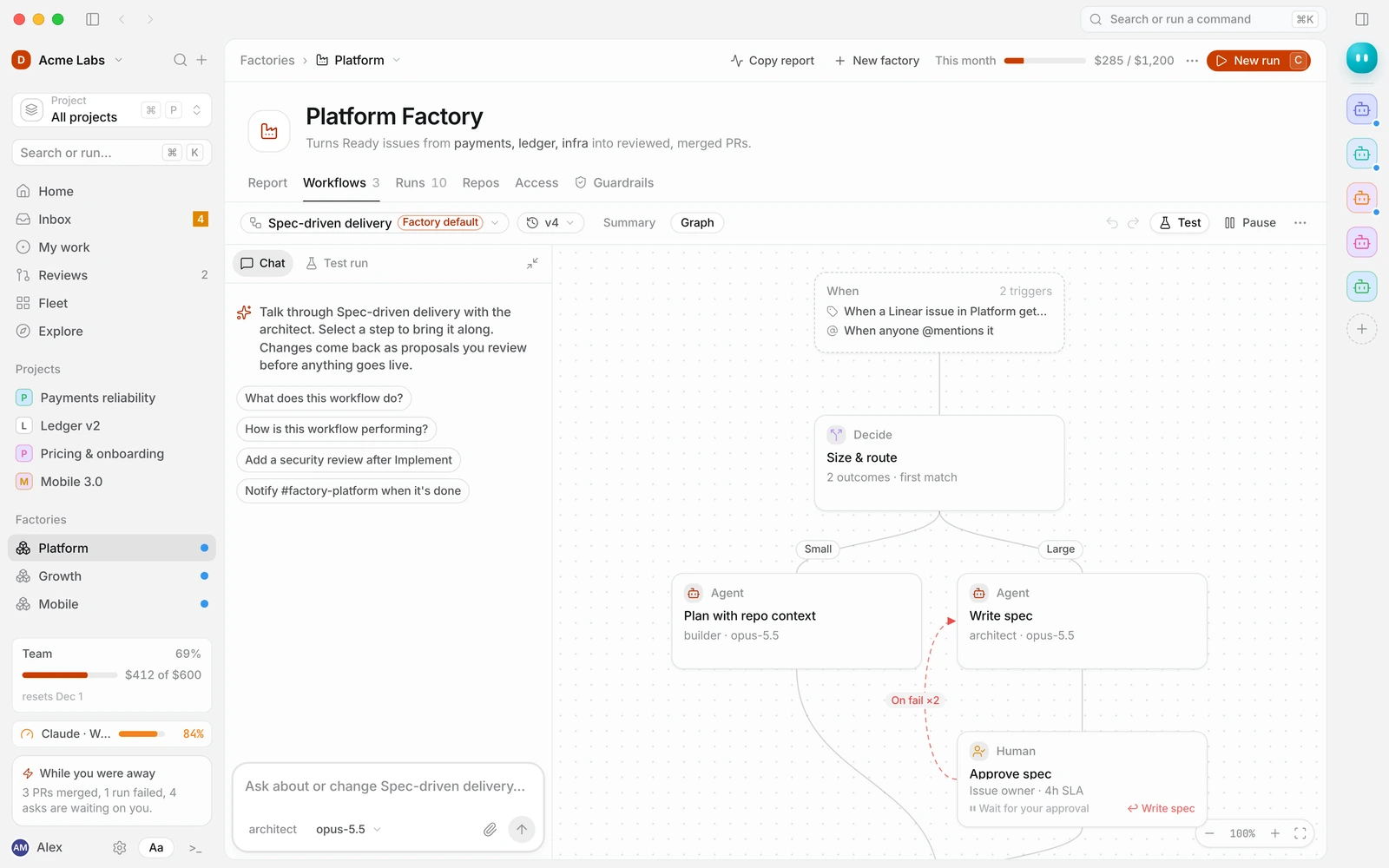
The workflow editor. A factory can have several workflows; one is the Factory default, used for new work unless a trigger or a person picks another. The workflow menu has Edit details, Set as factory default, Duplicate, Publish as template…, Pause / Resume and Archive. New workflow starts from a workflow in this factory, one from other factories, a built-in, Explore, or a blank workflow (“One agent step. Build the rest yourself.”).
Built-in workflows (Base Loop, Small change, Large change) are read-only: “Built-in workflows can’t be changed. Copy one into a factory to edit it.” Use Copy to this factory.
See Step kinds reference, Triggers and Versions and rollback.
Runs
Every run this factory started, filterable by state (for example Needs you) and workflow. Each row shows the run’s current step, agent, duration and cost. Runs stay bound to the workflow version they started on.
Repos
The repositories this factory’s workflows open pull requests in. Add a repository From GitHub or by pasting its URL, and set the Base branch PRs target. Each repository has a sandbox: a snapshot of the repo with its dependencies installed, so runs start fast.
| Setting | Options |
|---|---|
| Sandbox size | Standard (“Most repos”) or Large (“Monorepos, heavy builds”) |
| Platform | Linux, macOS or Windows (Windows sandboxes use PowerShell for install commands) |
| Install commands | One command per line. They run in order on a fresh base, then the result is snapshotted |
| Environment and secrets | Passed in as environment variables from Settings → API keys & secrets |
The sandbox status reads No sandbox, Waiting for a builder, Building sandbox…, Sandbox ready, Sandbox failed, Sandbox cancelled, Refreshing sandbox… or Refresh failed · sandbox ready. If a refresh fails, runs keep using the previous snapshot. Use Refresh snapshot (“Re-run install commands on a fresh base”) after you change dependencies, or Retry sandbox build after fixing an install command.
Access
Who can use the factory and what they can do.
| Role | Can |
|---|---|
| Owner | Everything an admin can do, plus transfer ownership |
| Admin | Edit workflows, repos, access and guardrails |
| User | Start runs, answer asks and see the report |
Share with workspace gives every member, including new ones, the User role. Who can start runs is Everyone with access, Admins and the owner or Only the owner (useful while you set the factory up); it applies to every workflow in the factory, and triggers keep running either way. Add people or teams grants access to individuals or teams. Only a person can own a factory; use Transfer ownership… to hand it over.
Workflows have their own roles: Owner, Editor and User.
Guardrails
Rules every run in this factory follows, on top of workspace settings. Guardrails can only tighten workspace rules, never loosen them.
- Permission mode: Ask for everything (“Every write and command becomes an ask. Best for new factories.”), Ask for writes (“Reads and allow-listed commands run freely; anything else asks. Recommended.”) or Autonomous in sandbox (“No asks inside a disposable sandbox with no network. Merge still gated.”).
- Command rules: patterns that run without asking (allow), become an ask in the inbox (ask), or are blocked and logged (deny). “Rules match the full command line. The first matching rule wins.” Each rule can apply to All steps or named steps.
- Allowed domains: “Agents can reach allow-listed domains only. Wildcards match subdomains.”
- Secrets: which secrets runs in this factory can read, per step, and whether each needs Ask on use.
- Automation rules: for example Auto-approve plans for docs-only changes, Auto-merge small, green PRs and Require CODEOWNERS for
payments/**andauth/**. - Isolate agent configuration: agents get a per-run config, and global
~/.claude,~/.codexand similar folders are never modified. - Redact secrets from logs and transcripts.
- Budgets: day and month caps for the whole factory. See Limits and budgets.
See Permissions and approvals for how these combine with Settings → Action approvals.
Pausing and archiving
Pause a workflow from its toolbar: “It won’t start on its own until you resume it.” Manual runs still work. To retire a whole factory, choose Archive… from its card. Archived factories leave the list (switch the filter to see them, and Restore if needed); their workflows stay in the workspace, and their repos and sandboxes stay too. The default factory can’t be archived.
Sharing a factory as a template
Publish as template… publishes the factory’s workflow, triggers and guardrails to Explore or your workspace. No secrets or repos are included: they become placeholders the installer fills in. See Publishing to Explore and Publish an item.
From the API
Factories are available in the Preview API at /v1/factories: list, create from a template, update, pause, resume and archive. See Factories API.